Choosing from the best 3D printers for beginners is one of the most important decisions you’ll make in this hobby — and it’s also one of the easiest to get wrong.
Buy too cheap and you’ll spend more time troubleshooting than printing. Buy without doing your research and you might end up with a machine that doesn’t match how you actually want to use it. This guide cuts through the noise.
Every printer on this list has been selected based on ease of setup, out-of-box reliability, software experience, and overall value. Whether you want something that just works or you’re looking for room to grow, there’s a right answer here for you.
If you’re brand new and haven’t yet figured out what 3D printing even involves, start with the Beginner’s Guide to 3D Printing before choosing a machine.
What Makes the Best 3D Printer for Beginners?
In 2026 the best 3D printers for beginners share a few key traits that separate a great first machine from a frustrating one:
Auto bed leveling is non-negotiable in 2026. Manual bed leveling used to be a rite of passage — now it’s just a waste of your time. Every printer on this list levels itself automatically before each print.
Setup time matters more than most buyers realize. A printer that takes 10 minutes to set up versus one that takes two hours creates very different first impressions, and those impressions determine whether you stick with the hobby.
Software ecosystem is what you’ll interact with every day. A polished slicer with pre-configured profiles means fewer failed prints and a faster learning curve.
Consistency is the feature nobody talks about but everyone cares about. A beginner printer that produces reliable, repeatable results lets you actually learn — instead of spending every session wondering if today’s failure was the printer or you.
Price tier coverage matters too. The best 3D printer for beginners isn’t always the cheapest or the most expensive — it’s the one that matches your budget and your goals.
Best 3D Printers for Beginners at a Glance
| Printer | Price | Best For | Build Volume |
|---|---|---|---|
| Bambu Lab P1S | $399 | Best overall | 256 × 256 × 256 mm |
| Bambu Lab A1 Mini | $299 | Best plug-and-play | 180 × 180 × 180 mm |
| Bambu Lab A1 | $299 | Best step-up from Mini | 256 × 256 × 256 mm |
| Flashforge Adventurer 5M | $240 (sale) | Best value | 220 × 220 × 220 mm |
| Creality Ender 3 V3 KE | ~$260 | Best budget open-source | 220 × 220 × 240 mm |
| Elegoo Neptune 4 Plus | $350 | Best large format | 320 × 320 × 385 mm |
1. Bambu Lab P1S — Best Overall Beginner 3D Printer
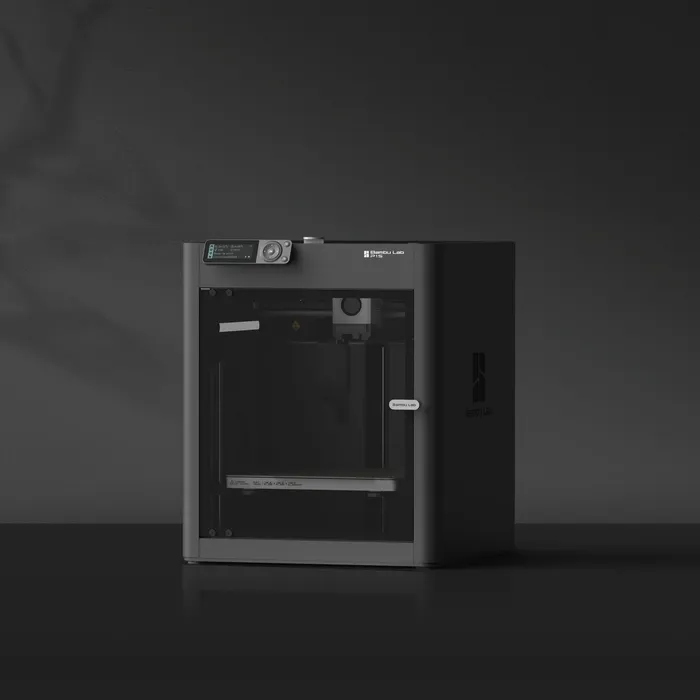
If you want the smoothest possible start in 3D printing, this is the printer to get.
The Bambu Lab P1S is fully enclosed, fast, and handles the hardest parts of 3D printing automatically. It was the first printer used here at Dialing In 3D, and it’s the reason we stuck with the hobby long enough to turn it into something meaningful.
Key specs:
- Build volume: 256 × 256 × 256 mm
- Max speed: 500 mm/s
- Enclosure: Fully enclosed
- Auto calibration: Yes — full-auto before every print
- Materials: PLA, PETG, ABS, ASA, TPU, and more
- Multi-color: Optional AMS system
- Price: $399
Why it’s the best overall pick:
The fully enclosed chamber is what separates the P1S from everything else on this list. Enclosure means better temperature control, which means more consistent prints, less warping, and access to engineering materials like ABS and ASA when you’re ready for them. Most beginner printers are open-frame — the P1S gives you a machine you can genuinely grow into.
Setup is fast and fully guided. From unboxing to first print typically takes under an hour, and Bambu’s automated calibration sequence handles bed leveling, Z-offset, and vibration compensation without any input from you.
Print quality out of the box is exceptional. The P1S uses Active Flow Rate Compensation to adjust extrusion in real time, which means cleaner wall surfaces and more consistent results even when switching between filament brands.
The Bambu ecosystem — Bambu Studio slicer, Bambu Handy app, MakerWorld model library — is the most polished in consumer 3D printing. Remote monitoring, timelapse recording, and one-tap print launching from your phone are all standard.
Where it falls short: It’s the most expensive printer on this list, and the closed ecosystem means less freedom to modify or tinker. If you want open-source firmware and community mods, look at the Creality or Elegoo options below.
Bottom line: For beginners who want the best possible experience from day one and plan to grow with their printer, the P1S is worth every dollar.
📖 Read our full Bambu Lab P1S Review
2. Bambu Lab A1 Mini — Best Plug-and-Play Beginner Printer
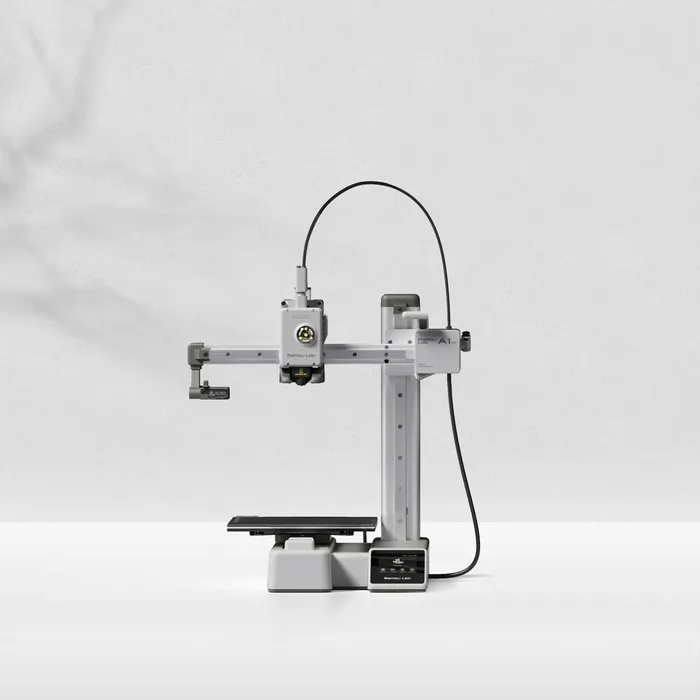
The best 3D printer for beginners who want a compact, affordable machine that works right out of the box — no compromise.
The A1 Mini delivers the full Bambu Lab experience in the most approachable package the brand makes. It’s smaller, lighter, and less expensive than the P1S while sharing the same software ecosystem and auto-calibration system.
Key specs:
- Build volume: 180 × 180 × 180 mm
- Max speed: 500 mm/s
- Enclosure: Open frame
- Auto calibration: Yes — full-auto
- Materials: PLA, PETG, TPU, PVA
- Multi-color: Yes — AMS Lite compatible
- Price: $299 solo / $349 Combo with AMS Lite
Why it’s the best plug-and-play pick:
The A1 Mini is the printer that most beginners should buy first. It combines Bambu’s class-leading automation with a compact footprint that fits comfortably on a desk, dorm room table, or smaller workspace. Setup takes under 20 minutes and the first print almost always succeeds — a rare claim in this hobby.
The AMS Lite compatibility is a genuine differentiator at this price. Multi-color printing — printing with up to 4 filament colors automatically — is available through the A1 Mini Combo at $349 — a feature you simply can’t get on any other printer at this price point.
Where it falls short: The 180mm cube build volume is the A1 Mini’s main limitation. It’s sufficient for the vast majority of beginner prints, but if you know you want to print larger objects, the A1 below is a better fit.
Bottom line: The best entry point into 3D printing in 2026. If you’re unsure which printer to get, start here.
📖 Read our full Bambu Lab A1 Mini Review
3. Bambu Lab A1 — Best Step-Up from the Mini

The natural next step for beginners who want more build volume without leaving the Bambu ecosystem.
The A1 shares the A1 Mini’s automation, software, and AMS Lite compatibility — but steps up to a full gantry design with dual Z-rails and a significantly larger build volume. At the same solo price as the Mini, it’s a compelling option for anyone who knows their prints will regularly push past 180mm.
Key specs:
- Build volume: 256 × 256 × 256 mm
- Max speed: 500 mm/s
- Enclosure: Open frame
- Auto calibration: Yes — full-auto
- Materials: PLA, PETG, ABS, TPU, PVA
- Multi-color: Yes — AMS Lite compatible
- Price: $299 solo
Why it earns a spot:
The A1’s dual Z-rail gantry provides more mechanical stability than the A1 Mini’s cantilever design — particularly relevant on tall prints where Z-wobble can become visible. It also adds ABS to the supported materials list, giving intermediate users more to work with.
The larger build volume is the headline. At 256mm cubed you get more than double the printable space of the A1 Mini by volume, opening up cosplay parts, display pieces, functional prototypes, and batch printing multiple objects in one run.
Where it falls short: It’s physically larger and the Combo pricing is higher than the Mini Combo. If desk space is limited or multi-color printing is your priority at the lowest cost, the A1 Mini is the better call.
Bottom line: If you’re choosing between the A1 Mini and A1 and space isn’t a constraint, the A1 gives you more room to grow at the same price.
📖 Not sure which to choose? Read our Bambu Lab A1 Mini vs A1 comparison
4. Flashforge Adventurer 5M — Best Value Beginner 3D Printer
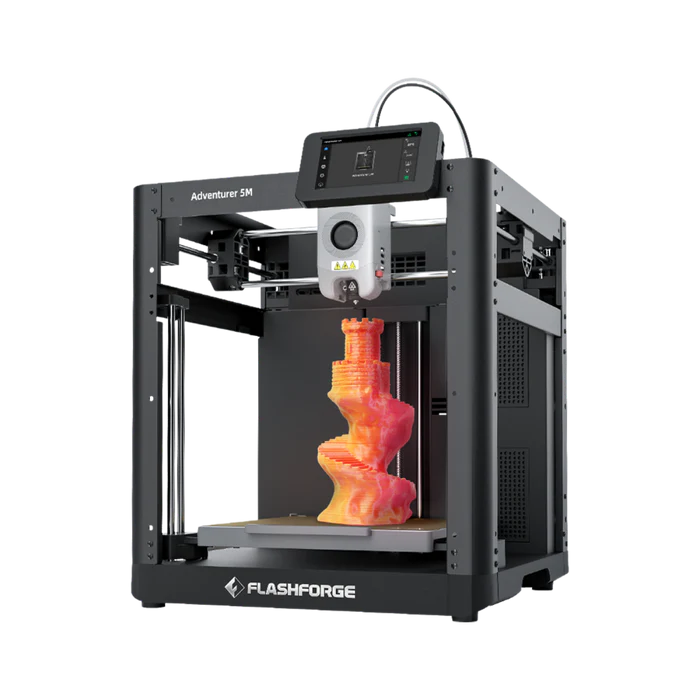
The best 3D printer for beginners who want serious performance without paying premium prices — and currently the strongest value on this entire list.
The Flashforge Adventurer 5M (AD5M) is flying under the radar compared to Bambu Lab, but its specs tell a different story. CoreXY motion system. 600 mm/s max speed. 10-minute setup. Auto bed leveling. And currently on sale for $240 — down from a base price of $299.
Key specs:
- Build volume: 220 × 220 × 220 mm
- Max speed: 600 mm/s
- Max acceleration: 20,000 mm/s²
- Enclosure: Open frame (optional enclosure kit available)
- Auto calibration: Yes — ADM auto leveling
- Materials: PLA, PETG, TPU, PLA-CF, PETG-CF
- Quick-swap nozzles: Yes — swaps in 3 seconds
- Price: $240 (on sale from $299)
Why it’s the best value pick:
The AD5M’s CoreXY motion system is the biggest differentiator at this price. Most printers in this range use a bed-slinger design where the print bed moves back and forth during printing. CoreXY moves the print head in both X and Y while the bed only moves vertically — the result is less vibration, higher reliable speeds, and better quality on tall prints.
At 600 mm/s with 20,000 mm/s² acceleration, the AD5M is actually faster on paper than every Bambu Lab printer on this list. Real-world quality print speeds of 150–300 mm/s are still 3–5x faster than a standard budget printer. A Benchy prints in around 27 minutes.
Setup takes under 10 minutes — Flashforge ships the AD5M 95% pre-assembled. The quick-release nozzle system is a practical standout: nozzles swap in 3 seconds with no tools, making clogs dramatically less painful to deal with as a beginner.
Where it falls short: No multi-color support, no built-in camera, and the ecosystem isn’t as polished as Bambu’s. ABS requires the optional enclosure kit.
Bottom line: At $240 on sale, the AD5M is the most performance per dollar of any printer on this list. If budget is a factor and you want speed and quality without paying Bambu prices, this is your printer.
📖 Read our full Flashforge Adventurer 5M Review
5. Creality Ender 3 V3 KE — Best Budget Open-Source Printer
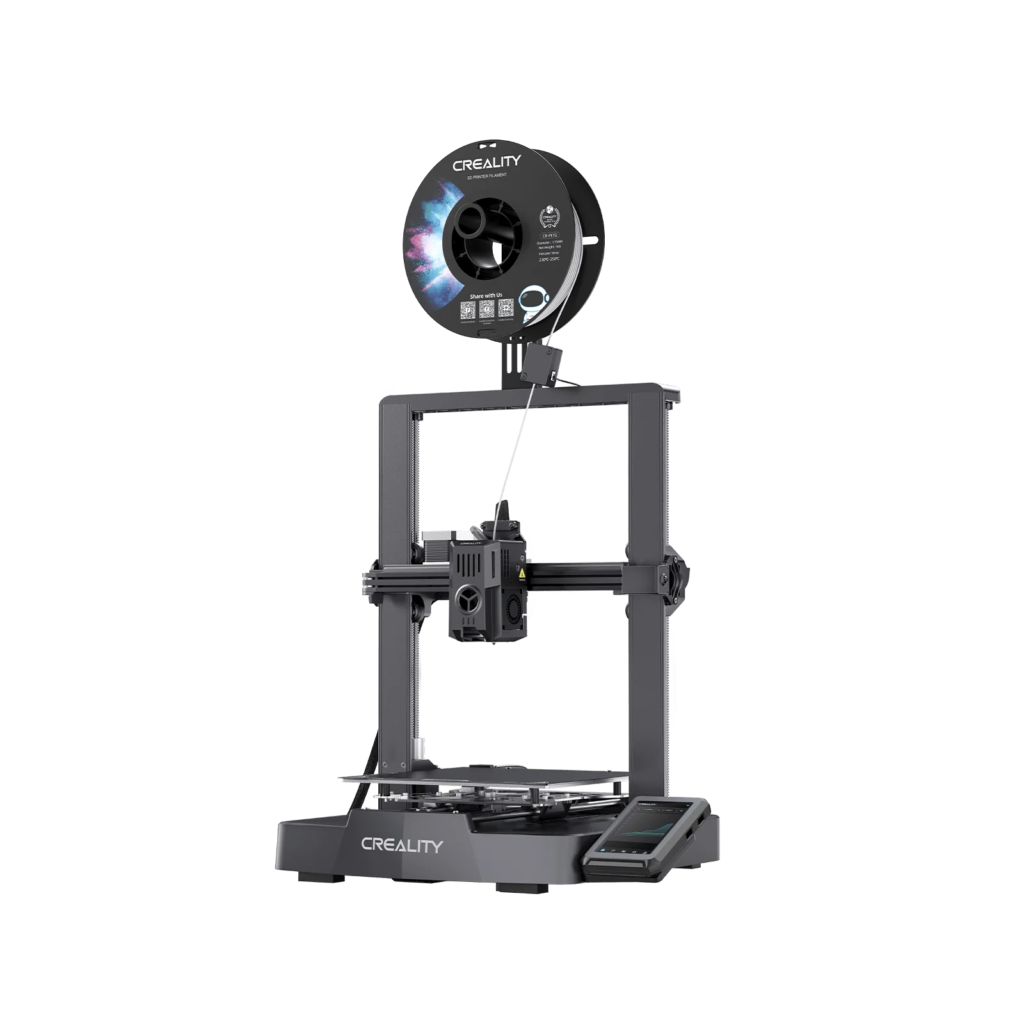
The best 3D printer for beginners who want open-source firmware, a massive community ecosystem, and a lower price point — and don’t mind a slightly more hands-on experience.
The Ender 3 name has been the default beginner recommendation in 3D printing for years. The V3 KE is the most current evolution of that line — significantly improved over older models with Klipper firmware, linear rails, direct drive, and 500 mm/s speed.
Key specs:
- Build volume: 220 × 220 × 240 mm
- Max speed: 500 mm/s
- Max acceleration: 8,000 mm/s²
- Firmware: CrealityOS (Klipper-based, open source)
- Auto calibration: Yes — CR Touch + strain sensor
- Materials: PLA, PETG, ABS, TPU
- Price: ~$260
Why it earns its spot:
The KE’s open-source Klipper firmware is its defining feature. Creality has made their implementation fully open source, meaning you can install vanilla Klipper, use Fluidd or Mainsail interfaces, and access the full depth of the 3D printing community’s knowledge and modifications. For beginners who want to understand their machine at a deeper level, no printer on this list offers more learning potential.
The Ender 3 ecosystem is the largest in consumer 3D printing — thousands of printable mods, aftermarket upgrades, and community guides exist specifically for this platform. If you hit a problem, someone has already solved it and posted about it.
At ~$260 it’s among the most affordable options on this list while still offering Klipper speeds, direct drive, and auto bed leveling that older budget printers couldn’t match.
Where it falls short: More hands-on than Bambu or Flashforge options. Out-of-box experience requires more dialing in, and there’s no camera, no multi-color support, and less polished software than the Bambu ecosystem.
Bottom line: The best choice for beginners who want to learn how 3D printers actually work, not just use one. The open-source community makes it the most educational printer on this list.
📖 See how it stacks up in our Bambu Lab A1 Mini vs Ender 3 V3 KE comparison
6. Elegoo Neptune 4 Plus — Best Large Format Beginner Printer

The best 3D printer for beginners who need a larger build volume and want open-source Klipper firmware at a mid-range price.
The Elegoo Neptune 4 Plus sits in a unique spot on this list — it offers the largest build volume of any printer here at 320 × 320 × 385 mm, Klipper firmware, and 500 mm/s speed, all for $350. For beginners who know they want to print cosplay pieces, large display models, or functional parts that simply won’t fit on other printers, the Neptune 4 Plus is the answer.
Key specs:
- Build volume: 320 × 320 × 385 mm
- Max speed: 500 mm/s (default 250 mm/s)
- Max acceleration: 12,000 mm/s²
- Firmware: Klipper (pre-installed)
- Auto calibration: Yes — 121-point auto bed leveling
- Nozzle temp: Up to 300°C
- Materials: PLA, PETG, ABS, ASA, TPU, Nylon
- Direct drive extruder: Yes — dual-gear 5.2:1
- Price: $350
Why it earns its spot:
The Neptune 4 Plus has the most impressive raw specs per dollar of any printer on this list. Its 320 × 320 × 385 mm build volume is nearly three times the printable space of the A1 Mini by volume. The 121-point auto bed leveling system is more thorough than most competitors. And the 300°C nozzle supports an exceptionally wide range of materials including Nylon — something you won’t find on most beginner printers at any price.
Klipper comes pre-installed and Elegoo has made the implementation accessible for beginners, with input shaping and pressure advance configured out of the box. The dual-gear direct drive extruder provides strong filament grip — particularly useful for flexible TPU prints that can be finicky on lesser setups.
Where it falls short: The Neptune 4 Plus is a bedslinger — the large bed moves back and forth during printing, which can limit quality on very tall prints at high speeds. Like the Ender 3, it requires more hands-on involvement than Bambu options and doesn’t have the same polished ecosystem. ABS printing works but benefits from an enclosure.
Bottom line: If build volume is your top priority and you want the most print space for your money, the Neptune 4 Plus delivers in a way nothing else on this list can match.
📖 Read our full Elegoo Neptune 4 Plus Review
How to Choose the Best 3D Printer for Beginners
Now that you’ve seen all six of the best 3D printers for beginners, here’s a simple decision framework:
You want the smoothest possible experience → Bambu Lab P1S The enclosed chamber, polished ecosystem, and ownership experience make it the best overall beginner printer. It costs more but saves time and frustration in ways that compound over months of printing.
You want plug-and-play simplicity in a compact package → Bambu Lab A1 Mini The best starting point for most beginners. Compact, affordable, fully automated, and multi-color capable with the AMS Lite. The default recommendation for anyone who isn’t sure what they need.
You want more build volume in the Bambu ecosystem → Bambu Lab A1 Same price as the Mini, same automation, noticeably more print space. The right call if you already know you’ll be printing larger objects regularly. Read the A1 Mini vs A1 comparison if you’re deciding between the two.
You want strong performance at the lowest price → Flashforge Adventurer 5M CoreXY speed, 10-minute setup, and $240 on sale makes the AD5M the best value on this list by a meaningful margin. The right call for budget-conscious beginners who don’t want to compromise on print quality.
You want to learn how 3D printing actually works → Creality Ender 3 V3 KE The most educational printer here. Open-source Klipper firmware, massive community support, and the most modification potential of any printer on the list. Requires more hands-on involvement but teaches you more in return. See how it compares in our A1 Mini vs Ender 3 V3 KE breakdown.
You need the largest build volume → Elegoo Neptune 4 Plus The only printer on this list that can handle large cosplay pieces, big display models, and oversized functional parts. If you already know your projects will regularly exceed 220mm in any dimension, this is your printer.
What About Filament?
Every printer on this list works best with quality PLA filament to start. PLA is the most forgiving material — easy to print, affordable, and consistent across brands.
For tested filament recommendations, see the Best PLA Filament for Beginners guide before your printer arrives.
Common Mistakes When Buying Your First 3D Printer
Buying the cheapest option available. The lowest-priced printers often require the most setup, tuning, and troubleshooting. What you save upfront can quickly cost you in frustration. Every printer on this list represents a floor, not a ceiling — there are cheaper options out there, but none worth recommending to a beginner. Every printer on this list represents a carefully vetted pick from the best 3D printers for beginners available in 2026.
Ignoring build volume until it’s too late. Most beginners don’t think about build volume until they download a model that won’t fit on their printer. If you have any plans to print larger objects — props, display pieces, functional parts — factor this in before you buy, not after.
Overlooking the software ecosystem. The printer is only part of the experience. A slicer you understand, a community you can ask questions in, and a library of pre-configured profiles makes an enormous difference in your first 90 days. Bambu’s ecosystem is the best in the business for beginners. Creality and Elegoo’s Klipper-based setups are more powerful but require more investment.
Expecting perfect prints immediately. Even the best printer on this list will produce imperfect first prints. There is a learning curve — settings, materials, model orientation, and support structures all take time to understand. The printers at the top of this list shorten that curve significantly, but they don’t eliminate it.
Not thinking about what you actually want to print. A beginner who wants to print miniatures has different needs than one who wants to print cosplay armor. Think about your use case before choosing — it’s the fastest way to land on the right machine.
The printers on this list represent the best 3D printers for beginners available in 2026 — each one chosen to minimize frustration and maximize your chances of a great first experience.
Frequently Asked Questions
What is the best 3D printer for complete beginners in 2026?
The Bambu Lab A1 Mini tops our list of best 3D printers for beginners in 2026. It’s compact, fully automated, and produces consistent results out of the box. Setup takes under 20 minutes and the learning curve is the gentlest of any printer on this list.
How much should I spend on my first 3D printer?
Most beginners find the sweet spot between $240 and $400. Below $200 you’re typically dealing with older hardware or a steeper learning curve. The printers on this list cover $240 to $399 and represent the best options at each price point.
Is 3D printing hard for beginners?
It’s much easier than it used to be. Modern printers with auto bed leveling and good software handle most of the difficult parts automatically. Most beginners get a successful print within their first session — the learning curve is real but manageable with the right machine.
Which 3D printer is best for beginners on a budget?
Among the best 3D printers for beginners on a budget, the Flashforge Adventurer 5M at $240 on sale is the strongest pick on this list — CoreXY speed, 10-minute setup, and auto leveling at a price that used to only get you basic hardware. The Creality Ender 3 V3 KE at ~$260 is the better choice if you want open-source firmware and a larger community.
What filament should beginners use?
PLA is the best starting point for beginners — easy to print, forgiving, and available from every brand. See the Best PLA Filament for Beginners guide for specific recommendations.
Do I need a 3D printer with an enclosure?
Not for PLA and PETG printing, which covers most beginner projects. An enclosure becomes important if you want to print ABS, ASA, or other engineering filaments that are prone to warping. The Bambu Lab P1S is the only fully enclosed printer on this list.
Is the Bambu Lab ecosystem worth it for beginners?
Yes — especially for first-time buyers. Bambu Studio, the Bambu Handy app, MakerWorld, and the tight hardware-software integration create the most beginner-friendly experience in consumer 3D printing. The trade-off is a closed ecosystem with less freedom to modify.
Some links in this article are affiliate links. If you purchase through them, we earn a small commission at no extra cost to you. This helps keep Dialing In 3D running and allows us to keep testing and recommending products based on real experience.