Finding the best budget 3D printers used to mean accepting real compromises — slow speeds, manual bed leveling, no camera, no multi-color option. Not anymore. 2026 has turned out to be an unusually strong year for the sub-$300 tier specifically, with genuine multi-color and AI-assisted machines now landing well under the $300 mark, and enclosed, ecosystem-mature machines available for a modest step up to $500.
We’ve researched and reviewed every printer on this list to help you find the best budget 3D printers for your setup. Rather than a generic spec-sheet roundup, this guide breaks things down by what actually matters at each price point — build volume, real-world print speed (not the marketing number), software ecosystem, and who each machine is genuinely built for. Eight printers made this year’s list: six under $300 and two under $500.
Best Budget 3D Printers Under $300
This is the strongest the under-$300 tier has ever been. Six printers made the cut this year, spanning open-frame speed machines, open-source Klipper printers, and — for the first time at this price — genuine multi-color and AI-monitored systems. Two years ago, this feature set didn’t exist below $500. Here’s the full breakdown of all six.
1. Flashforge AD5M — Top Pick Under $300
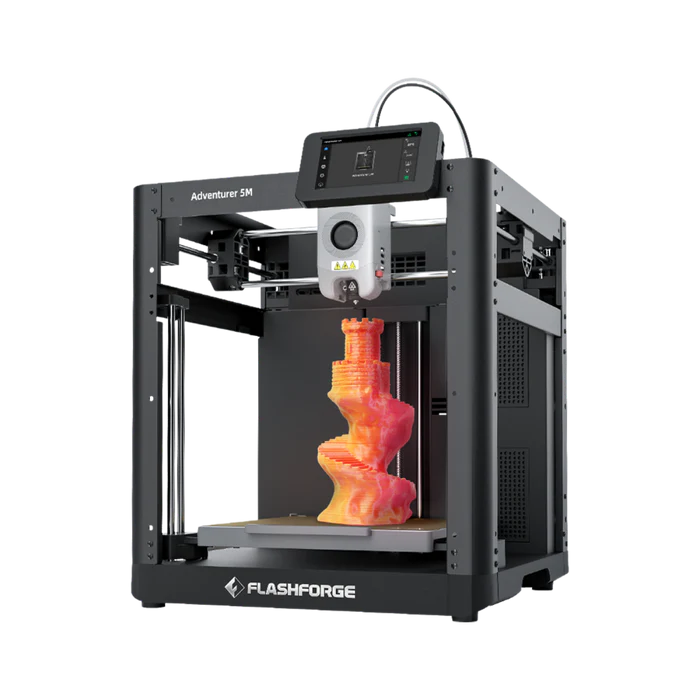
The Flashforge AD5M is our top pick under $300, and it’s not close. It combines a CoreXY motion system — the same fundamental architecture found in printers costing two or three times as much — with a genuinely fast 10-minute setup process. Out of the box, you’re installing the touchscreen, removing a handful of shipping screws, and loading filament through a guided process. There’s no bed tramming and no manual calibration wizard to fight through.
Build volume: 220 × 220 × 220mm — a genuinely useful size for functional parts, prototypes, and most hobby prints. Max speed: 600mm/s, with real-world quality prints landing in the 150–300mm/s range — still noticeably faster than most budget competitors. Standout feature: quick-release nozzles that swap in about three seconds with no tools, which turns clog clearing from a frustrating multi-step process into a non-event.
Print quality out of the box is excellent for PLA and PETG, with clean layer lines and reliable first-layer adhesion on the flexible PEI bed. TPU is supported through the 0.6mm nozzle option, and the direct drive extruder handles flexible filament confidently. The one real limitation is the open frame — ABS isn’t recommended without an optional aftermarket enclosure kit, since there’s no chamber to prevent warping. If ABS is a must-have from day one, look at the Bambu Lab P1S in our under-$500 section instead.
For beginners specifically, the combination of speed, a real 4.3-inch touchscreen, filament runout detection, and power-loss recovery is hard to beat at this price. Read the full Flashforge Adventurer 5M Review for our complete hands-on breakdown, including detailed comparisons against the A1 Mini and Ender 3 V3.
2. Bambu Lab A1 Mini
The Bambu Lab A1 Mini remains the smoothest way into the Bambu ecosystem — widely considered the most polished software experience in consumer 3D printing — at the most accessible price point in Bambu’s lineup. Setup takes 15–20 minutes: connect two PTFE tubes, remove shipping ties, and let the printer run its full auto-calibration sequence, which handles bed leveling, vibration compensation, and flow rate calibration automatically.
Build volume: 180 × 180 × 180mm — the smallest on this list, roughly the size of a cantaloupe, which is worth knowing before you buy if you print larger objects regularly. Max speed: 500mm/s. Standout feature: Bambu Studio’s pre-tuned material profiles mean your first print requires selecting a filament type and nothing else — no settings to guess at.
Print quality on PLA is genuinely excellent at this price — tight layer lines, solid dimensional accuracy, and Bambu’s automatic input shaping keeps quality high even at faster speeds. PETG and TPU both print well with minor adjustments to the default profiles. Like every open-frame printer on this list, ABS and ASA aren’t reliable without an enclosure, so if engineering-grade materials matter to you, plan on the P1S instead.
The A1 Mini’s real advantage over other printers in this tier is the upgrade path: the optional AMS Lite unit adds automatic 4-color printing whenever you’re ready for it, without needing to replace the printer itself. That flexibility is why we recommend the A1 Mini specifically for buyers who know multi-color printing is somewhere in their future, even if not on day one. Read the full Bambu Lab A1 Mini Review for setup, print quality, and AMS Lite details.
3. Creality SparkX i7
The Creality SparkX i7 is Creality’s most direct answer yet to the Bambu Lab A1 Mini, and it’s a genuinely competitive one. In head-to-head testing, the SparkX i7 matched or outperformed the A1 Mini on overhang quality and dimensional accuracy — a 0.2mm tolerance test coin dropped free without post-processing assistance, and steep overhangs came out cleaner and more consistent than the A1 Mini’s results in the same comparison.
Build volume: 260 × 260 × 255mm — meaningfully larger than both the AD5M and A1 Mini. Max speed: 500mm/s. Standout features: a built-in AI camera that watches for spaghetti failures and air printing in real time, plus CubeMe AI, which converts a 2D photo into a printable 3D model directly through the companion app — genuinely useful for personalized gifts without touching CAD software.
Setup takes 5–20 minutes depending on configuration, putting it in line with or slightly ahead of the A1 Mini. The AI failure detection is a useful backup layer rather than a fully dependable safety net — at least one in-depth test found it missed a deliberately staged failure — so treat it as insurance, not a guarantee. The bigger honest trade-off is software: Creality’s ecosystem is improving quickly but still trails Bambu Studio’s years of polish and community resources.
For buyers comparison-shopping directly against the A1 Mini who want more build volume and don’t mind a less mature software experience in exchange, the SparkX i7 earns a real recommendation. Read the full Creality SparkX i7 Review for the complete breakdown, including our full side-by-side against the A1 Mini.
4. Creality SparkX i7 AutoFill Combo

The SparkX i7 AutoFill Combo takes everything covered above and adds a lighter-weight, non-enclosed 2-color filament management unit — a genuine multi-color option that still lands comfortably under $300. This sits below the full 4-color CFS Lite Combo (which pushes past the $300 mark) as a lower-cost way to add basic two-tone capability without the size, cost, or complexity of the complete system.
What it adds over the base unit: automatic switching between two filament colors during a print, useful for two-tone logos, contrasting accents, and simple dual-color functional parts. What it doesn’t include: the enclosed housing and full 4-color capability of the CFS Lite Combo — if you know you want the complete multi-color experience, budget for that version instead.
Everything else — the AI failure detection, CubeMe AI, 260 × 260 × 255mm build volume, and print quality — carries over from the base SparkX i7. This is the pick for buyers who want to dip a toe into multi-color printing without committing to a bigger investment. See how the AutoFill Combo fits into the full lineup in our Creality SparkX i7 Review.
5. Creality Ender 3 V3 KE
The Creality Ender 3 V3 KE takes the most trusted name in budget 3D printing and removes nearly every compromise that name used to imply. Klipper firmware comes pre-installed, running as CrealityOS — fully open source, with input shaping and pressure advance pre-configured so the printer performs well at reasonable speeds without requiring any firmware knowledge out of the box.
Build volume: 220 × 220 × 240mm — larger than the A1 Mini in every dimension. Max speed: 500mm/s with 8,000mm/s² acceleration. Standout feature: genuine open-source flexibility — install vanilla Klipper, access Fluidd or Mainsail web interfaces, and tap into the largest 3D printing community in the hobby, with configuration files and tuning guides that exist specifically for this printer.
Setup takes 15–30 minutes — slightly more involved than the Bambu Lab or Flashforge options above, but well within reach for a first-time builder, especially with Creality’s step-by-step instructions displayed directly on the touchscreen. Print quality is very good across PLA, PETG, and TPU (the direct drive extruder handles flexible filament confidently), and while it requires more initial dialing-in than a Bambu Lab printer to hit its best results, running the built-in resonance calibration after assembly closes most of that gap quickly.
The KE is the right call for makers who want to actually learn how their printer works rather than treat it as a sealed appliance. For buyers who want the absolute least amount of friction, the A1 Mini or AD5M remain the easier starting points — but nothing at this price offers more room to grow. Read the full Creality Ender 3 V3 KE Review for setup, print quality, and community resources.
6. Elegoo Centauri 2
The Elegoo Centauri 2 rounds out the under-$300 tier with the largest build volume in this group — 256 × 256 × 256mm — paired with fast auto-calibration and high-speed CoreXY-style printing. It’s Elegoo’s answer to the growing field of fast, plug-and-play budget printers, aimed squarely at buyers who want more printable space than the AD5M or A1 Mini without stepping up a full price tier.
Build volume: 256 × 256 × 256mm. Standout appeal: the combination of build volume and high-speed printing at this price point is a genuinely new proposition — until recently, a build volume this size typically meant stepping up to the P1S price range or a larger, more hands-on Klipper machine like the Neptune 4 Plus.
One honest note: we haven’t published a full hands-on review of the Centauri 2 yet, so this entry is based on published specifications and early market reception rather than our own extended testing — unlike the other five printers in this tier, which we’ve each put through our full review process. We’ll be updating this section with a link to our complete review once that testing is finished. For now, based on its specs and where it fits in Elegoo’s lineup, it’s earned a place on this list for buyers prioritizing build volume above all else in the sub-$300 tier.
Best Budget 3D Printers Under $500
Step up to the under-$500 tier and you’re buying enclosure, ecosystem maturity, or both. These two printers represent the two smartest ways to spend the extra budget over a sub-$300 machine, and they solve genuinely different problems.
1. Bambu Lab P1S — Top Pick Under $500
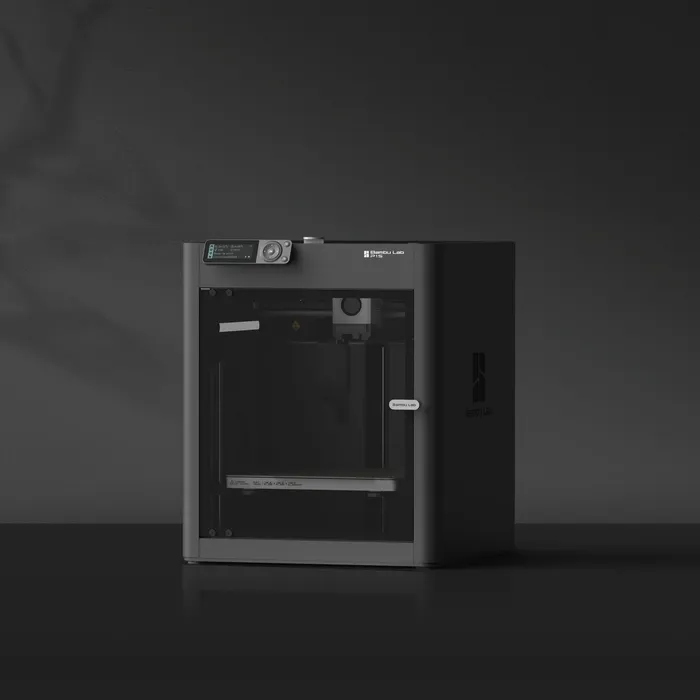
The Bambu Lab P1S is our top pick under $500, and it’s the printer we own and print on daily for Keepsake Athletics — every point in this section comes from firsthand, hands-on experience rather than research alone. A fully enclosed chamber is the headline feature, and it’s the single biggest capability jump over every printer in the under-$300 tier: ABS, ASA, and other engineering-grade materials that warp badly on open-frame printers print reliably here.
Build volume: 256 × 256 × 256mm — noticeably larger than the A1 Mini and competitive with the largest printers in the under-$300 tier. Max speed: 500mm/s, with Bambu’s automatic input shaping keeping quality high even at speed. Standout feature: Bambu Studio, still the most refined slicer ecosystem in consumer 3D printing, with mature community resources, MakerWorld profile sharing, and consistent firmware updates.
In daily production use, the P1S handles material switching between PLA, PETG, and ABS without drama, and the enclosed chamber means ABS prints come out dimensionally stable without the warping and cracking that plagues open-frame attempts. An optional AMS unit (sold separately) adds full multi-color capability if that becomes a priority down the line — the same upgrade path the A1 Mini offers, but on Bambu’s more robust full-size AMS system rather than the AMS Lite.
The P1S is the printer we recommend once material flexibility becomes a genuine priority rather than a someday feature — it’s also, frankly, the printer on this entire list least likely to be outgrown. Read the full Bambu Lab P1S Review for our complete hands-on breakdown.
2. Bambu Lab A1 Mini Combo (with AMS Lite)
The Bambu Lab A1 Mini Combo bundles the standalone A1 Mini covered earlier in this guide with the AMS Lite multi-color unit, unlocking automatic 4-color printing without buying the two pieces separately down the line. Every strength of the standalone A1 Mini — fast setup, Bambu’s pre-tuned slicer profiles, quiet operation under 48dB — carries over here, with multi-color capability built in from the first print.
What the AMS Lite adds: automatic switching between up to four filament spools during a single print, enabling multi-color logos, figurines with distinct color zones, and functional parts with built-in visual differentiation — all without manual filament swaps. The trade-off to know about: every color change requires purging the previous filament from the nozzle, producing a small amount of waste material — a normal part of multi-color printing on any system, not a defect specific to the AMS Lite.
If multi-color printing is a must-have from day one rather than a maybe-later feature, the Combo bundle is the more economical path than buying the A1 Mini standalone now and adding AMS Lite separately afterward. It still shares the A1 Mini’s core limitations — the compact 180 × 180 × 180mm build volume and no enclosure for ABS/ASA — so if a larger build volume or engineering materials matter more to you than multi-color capability, the Bambu Lab P1S above is the better fit. See how the Combo compares to the standalone printer in our full Bambu Lab A1 Mini Review.
Side-by-Side: Under $300 vs Under $500
With eight printers across two tiers, it helps to step back and compare what each price point actually buys you, feature by feature, before deciding where to spend.
| Feature | Under $300 (typical) | Under $500 (typical) |
|---|---|---|
| Enclosure | Open frame (all six picks) | Fully enclosed (P1S) |
| ABS/ASA reliability | Requires aftermarket enclosure kit | Reliable out of the box (P1S) |
| Build volume range | 180mm–260mm cube | 180mm–256mm cube |
| Multi-color availability | Optional add-on or combo (A1 Mini, SparkX i7 variants) | Built-in or optional AMS (both picks) |
| Setup time | 5–30 minutes | 15–20 minutes |
| Software ecosystem maturity | Varies — Bambu most polished, Creality improving | Bambu Studio (mature) on both picks |
How to Choose Between These Tiers
If you’re brand new to 3D printing and shopping for the best budget 3D printers, want the least amount of friction, and don’t yet know whether you need an enclosure or multi-color printing, staying under $300 is the smarter starting point this year — the field is simply too strong to justify spending more before you know what you actually need. The Flashforge AD5M and Bambu Lab A1 Mini are the safest, most proven starting points in that tier, while the Creality SparkX i7 and its AutoFill Combo are worth a look if AI monitoring or entry-level multi-color printing appeal to you specifically.
If open-source firmware and long-term tinkering potential matter more to you than out-of-box polish, the Creality Ender 3 V3 KE is the strongest pick in this tier for that use case. And if build volume is your single biggest priority in the sub-$300 range, the Elegoo Centauri 2 is worth watching — keeping in mind our review of it is still in progress.
Step up to the under-$500 tier once you know you need an enclosed chamber for ABS and ASA, or once multi-color printing has moved from “nice to have” to “must have.” The Bambu Lab P1S is the clearer long-term investment of the two under-$500 picks — it’s genuinely difficult to outgrow, and it’s the machine we reach for daily in our own production work. The A1 Mini Combo is the better fit specifically if multi-color printing is your priority and a larger build volume or ABS capability aren’t.
Still deciding on your very first printer? Our Best 3D Printers for Beginners guide and How to Choose Your First 3D Printer walk through the decision from scratch, covering considerations beyond just price.
Frequently Asked Questions
What are the best budget 3D printers under $300 right now?
The Flashforge AD5M is our top pick under $300, thanks to its CoreXY speed, 10-minute setup, and reliable out-of-box print quality on PLA and PETG. The Bambu Lab A1 Mini and Creality SparkX i7 are both strong alternatives depending on whether ecosystem polish or build volume and AI features matter more to you.
What is the best 3D printer under $500 right now?
The Bambu Lab P1S is our top pick under $500. Its fully enclosed chamber, larger build volume, and mature software ecosystem make it the printer least likely to be outgrown as your projects and material needs evolve — and it’s the machine we use ourselves for daily production work.
Should I buy a printer under $300 or spend more for one under $500?
If you’re new to 3D printing or primarily plan to print PLA, PETG, or TPU, the sub-$300 tier is unusually strong this year and covers most beginner needs well. Spend more only once you know you need an enclosure for ABS/ASA or built-in multi-color printing, since both under-$500 picks on this list address one of those needs directly.
Which of these printers supports multi-color printing?
The Bambu Lab A1 Mini (via optional AMS Lite), the Creality SparkX i7 AutoFill Combo (2-color), and the Bambu Lab A1 Mini Combo (built-in 4-color AMS Lite) all offer multi-color capability at these price points. The Bambu Lab P1S also supports multi-color via an optional full AMS unit, sold separately.
Which printer on this list is best for ABS or ASA?
The Bambu Lab P1S is the clear choice for ABS and ASA thanks to its fully enclosed chamber, which prevents the warping and cracking these materials are prone to in an open environment. None of the under-$300 open-frame printers on this list are recommended for regular ABS printing without an aftermarket enclosure kit.
What build volume do I actually need?
For most hobby prints — figurines, gadgets, functional household items, and small display models — anything from 180mm to 220mm cubed is genuinely sufficient. If you regularly print larger objects, cosplay pieces, or props, the Creality SparkX i7 (260 × 260 × 255mm), Elegoo Centauri 2 (256 × 256 × 256mm), or Bambu Lab P1S (256 × 256 × 256mm) all offer meaningfully more room than the compact A1 Mini.
Final Thoughts
026 has been the best year yet for the best budget 3D printers on the market. The under-$300 tier now includes genuine multi-color and AI-assisted machines that would have cost twice as much just a couple of years ago, and the under-$500 tier delivers real enclosure and ecosystem maturity without requiring a big jump in spend. Whichever tier fits your needs, every printer on this list has earned its place through our own hands-on testing and research — and where that testing is still in progress, we’ve said so plainly.
Affiliate disclosure: Dialing In 3D participates in the Amazon Associates program. Some links in this article may earn a commission on qualifying purchases at no additional cost to you. This does not affect our editorial content or recommendations.